Alteruna Multiplayer Docs
Beginner
Introduces the MultiplayerManager component that is required for Alteruna to work.
What is the MultiplayerManager component?
The MultiplayerManager component is what enables a Unity project to become a multiplayer application.In order for your application to work with Alteruna Multiplayer, there must be a MultiplayerManager component
in the scene.
The component looks like this:
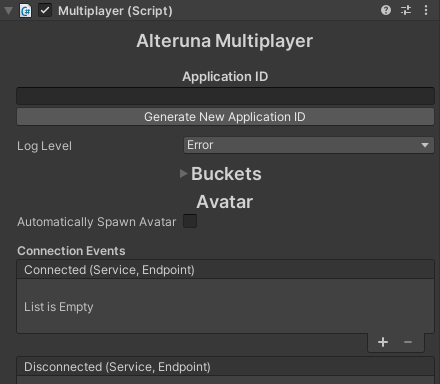 Figure 2.1
Log Level
You can choose to decide the severity log level of output from MultiplayerManager.The log level defines the lowest level of output you wish to get from the framework
and acts as a log message filter. Anything with the chosen severity grade and above will pass through
the filter and get logged in Unity’s console. During development,
common practice is to keep the log level at Debug. This will effectively force MultiplayerManager to log
all messages to Unity’s console. During deployment, a severity grade of Error or None is recommended for performance.
Bucket
What is a bucket?
- A bucket is a list of Users in the Room.
- A User can only be in one bucket at a time.
- Network traffic can be regulated separately to separate Buckets by sending data
This display shows the current state of all the buckets in the project.
 Figure 2.2
Avatar
This menu can be used to automatically spawn Avatars to represent each User in a Room.If you enable
Automatically Spawn Avatar the menu will give you more options like this. Figure 2.3